
Extra databases · more MySQL for one site
Give any site more MySQL databases — each with its own user, right beside it
Every site with us comes with one database. When a site needs more — a second app, a staging copy, a shop, a forum or its own analytics store — add extra databases to it from your dashboard. Each one runs next to the site on the same server, has its own user and password, and shows up in the site’s phpMyAdmin beside the site database.
- $1 per database / month
- Its own user & password
- In the site’s phpMyAdmin
- Backed up every day
- Every site type with a database
- Nothing renews automatically
Already a customer? Open Extra databases in your dashboard. Prefer to read the steps first? Read the guide.
What you can do with it
Run a second app on the same site
A shop, a forum, a booking system or your own PHP app beside WordPress — each with its own database instead of squeezing its tables into the site’s.
Keep a staging copy
Import a copy of the site database into an extra one, try a change there, and keep the live database untouched.
Separate data that grows
Logs, statistics or imports that grow fast live in their own database, with their own user, so a mistake in one cannot touch the other.
How it works
Add a database to a site
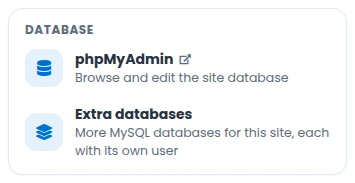
Open the site in your dashboard and click Extra databases. Give the database a short name, choose 1, 3, 6 or 12 months, and pay with PayPal (which also takes cards) or crypto. It is created within a minute or two.
Works for WordPress, PHP hosting, Joomla, Drupal, PrestaShop, OpenCart, MediaWiki and Grav sites. Static HTML sites have no database server.
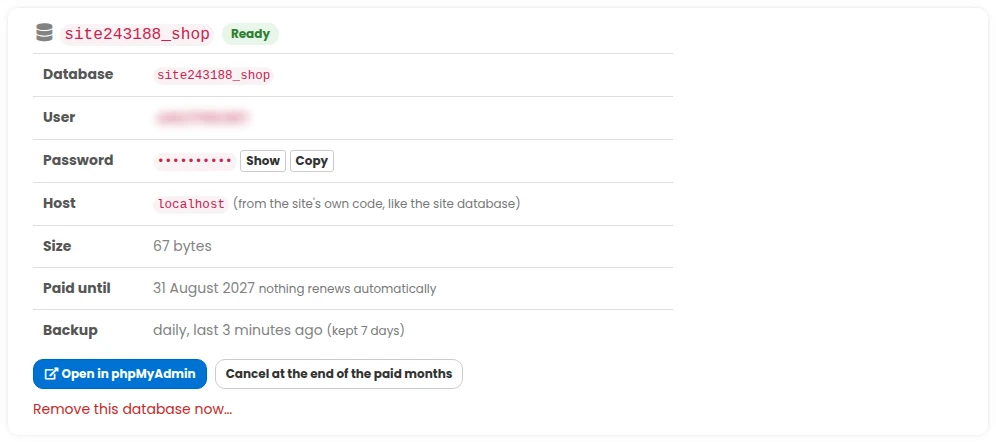
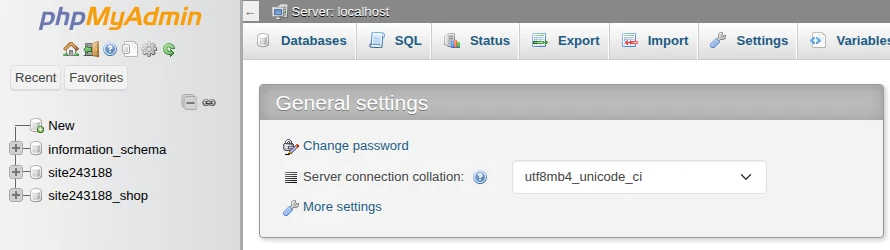
Open it in phpMyAdmin, or connect from your code
Open in phpMyAdmin signs you in as the database’s own user in one click. The site’s usual phpMyAdmin lists the site database and every extra database together, so you can import, export and copy tables between them.
From your code: host localhost, with the database name, user and password shown on the page — exactly like the site database.
Looked after like the site
Every extra database is copied every day, and you can restore any of the last seven copies yourself in one click. It is in the site’s own daily backup and hourly restore points too. Removing one always takes a full copy first, kept 30 days. If the site moves to another server, its extra databases move with it.
One simple price per database
In US dollars, plus VAT where it applies. Pay for 1, 3, 6 or 12 months with PayPal (which also takes cards) or with crypto (from $5).
Extra database
- One MySQL database for one site
- Its own user and password
- In the site’s phpMyAdmin
- Backed up every day
- Moves with the site
- Full copy kept 30 days after removal
- Cancel any time — nothing renews automatically
Each extra database is billed per site, per month, for as many months as you choose. Nothing renews automatically: we remind you a week before the paid months end. The site database and its extra databases share the site’s database allowance — if you need more room, add database space from the site’s Usage & add-ons tab.
Do you need a hosting plan with us?
Yes. An extra database belongs to a site you host with us — it runs next to that site on the same server. If you already host with us, open any site with a database and click Extra databases. Related: Redis makes the same sites faster, and our hosting plans list what every site includes.
Questions people ask
How much does it cost?
$1 per extra database, per site, per month, plus VAT where it applies. Pay for 1, 3, 6 or 12 months at once with PayPal or crypto.
Which sites can have extra databases?
Every site type that has a database: WordPress, PHP hosting, Joomla, Drupal, PrestaShop, OpenCart, MediaWiki and Grav. Static HTML sites have no database server, so they cannot.
How many can one site have?
Up to ten extra databases per site.
How do I connect to it?
Use host localhost with the database name, user and password shown on the site’s Extra databases page — the same way the site reaches its own database. The site’s own database user can reach it too.
Can I open it in phpMyAdmin?
Yes. Open in phpMyAdmin signs you in as the extra database’s own user, and the site’s usual phpMyAdmin shows the site database and all its extra databases together.
Is it backed up, and can I restore it myself?
Yes. Every extra database is copied every day (kept for a week) and you can restore any of those copies yourself from the site’s Extra databases page. It is also in the site’s own daily backup and, if the site has hourly backups, in every hourly restore point. Removing a database always takes a full copy first, which we keep for 30 days.
How much space do I get?
The site database and its extra databases share the site’s database allowance. If together they go over it, the extra databases become read-only until you delete data or add database space — we e-mail you when it happens.
What happens when I cancel?
The database keeps working until the end of the months you paid for, then we take a full copy and remove it. Months already paid are not refunded. You can undo a cancellation any time before then.
What if I forget to renew?
We remind you a week before. If it is not renewed it keeps working for a few more days, then we take a full copy, keep it for 30 days, and remove the database.
What happens if I delete the site?
Its extra databases are removed with it — after a full copy is taken, which we keep for 30 days.
Give your site the databases it needs
$1 per extra database per month, its own user, in phpMyAdmin, backed up every day.