
API & MCP server · included with your account
Run your hosting from your AI assistant, your scripts and your own dashboards
The PBN LTD API and MCP server let Claude, ChatGPT, Cursor and any other AI assistant — or your own code — work with your account directly. Ask in plain words (“which of my sites are offline?”, “add a TXT record to example.com”, “publish this post”) and it is done through the same checks as your dashboard: sites, DNS, backups, files, content, SEO tools, domains and add-ons.
- Included at no extra cost
- Over 300 actions
- Works with Claude, ChatGPT, Cursor
- REST + MCP
- Keys limited to chosen areas and sites
- Revoke any time
Developer? Read the API documentation. Prefer a short guide first? Connect an AI assistant, step by step.
What your assistant or your code can do
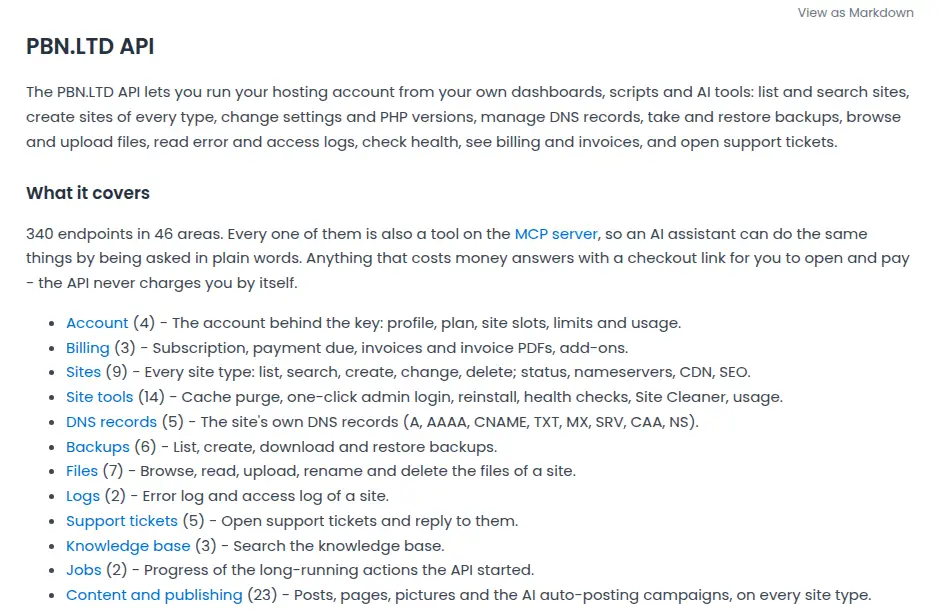
The API does what the dashboard does. Every area below has its own reference page in the documentation, with examples — and every action is also a tool on the MCP server.
Sites and hosting
List, search and create sites of every type, change settings and PHP version, purge the cache, one-click admin logins, health checks and Site Cleaner. DNS records, backups and hourly backups, files, error and access logs, cron jobs, staging sites, extra databases, Redis, Performance Boost, mailboxes and website e-mail sending.
Content and building
Write and publish posts and pages on any site type, with their pictures. Upload a built site, set the home page, install and test plugins and themes, run the AI auto-posting campaigns, and restore old pages with Wayback restore.
SEO tools
Rank tracking, AI visibility, the index checker, keyword research and domain overview, domain vetting, the footprint checker, site audits, the backlink monitor, brand mentions, local rankings, reputation monitoring, product price and competitor tracking, agency SEO data and client reports.
Security
The website firewall, “under attack” mode, a site’s own firewall rules and blocking AI crawlers, the Turnstile bot check, the country lock (limit a site to the countries you choose), and plugin updates we hold back when they would break a site.
Domains and money sites
Connect your domain registrar accounts so nameservers are set for you, see each site’s status and history, and manage your money-site hosting.
Account and support
Your plan, site slots, limits and usage, invoices and invoice PDFs, support tickets (open one or reply), the knowledge base, and the progress of anything that finishes later.
It never takes a payment by itself. Anything that costs money answers with a checkout link for you to open and pay. Deleting, restoring and overwriting are marked as destructive, so a well-behaved assistant asks you first.
Connect your AI assistant in a minute
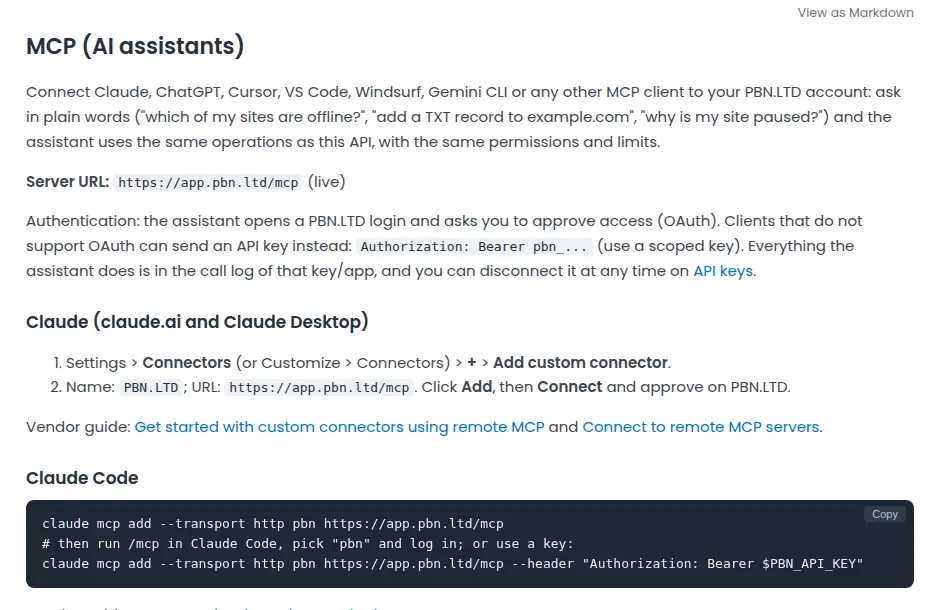
The MCP server address is https://app.pbn.ltd/mcp. Your assistant opens a PBN LTD login, shows exactly what it is asking for, and you approve or refuse. Clients that cannot log in that way send an API key instead: Authorization: Bearer pbn_...
Claude (claude.ai and Claude Desktop)
- Settings > Connectors > + > Add custom connector.
- Name:
PBN.LTD, URL:https://app.pbn.ltd/mcp. - Click Add, then Connect, and approve on PBN LTD.
Claude Code
claude mcp add --transport http pbn https://app.pbn.ltd/mcpThen run /mcp, pick “pbn” and log in — or add --header "Authorization: Bearer $PBN_API_KEY" to use a key.
ChatGPT
- Settings > Security and login: switch on Developer mode.
- Open Apps > +, name it PBN.LTD, choose the public endpoint option and enter
https://app.pbn.ltd/mcp. - Approve access on PBN LTD when asked.
Cursor
Add this to ~/.cursor/mcp.json (or .cursor/mcp.json in a project):
{"mcpServers": {"pbn": {"url": "https://app.pbn.ltd/mcp"}}}VS Code (GitHub Copilot)
Command Palette > MCP: Add Server > HTTP, URL https://app.pbn.ltd/mcp — or in .vscode/mcp.json:
{"servers": {"pbn": {"type": "http", "url": "https://app.pbn.ltd/mcp"}}}Windsurf, Gemini CLI and the rest
Any client that supports remote MCP servers over Streamable HTTP works: give it https://app.pbn.ltd/mcp and let it log in, or send the Authorization: Bearer pbn_... header. Exact steps for Windsurf, Gemini CLI, Zed and others are in the MCP guide.
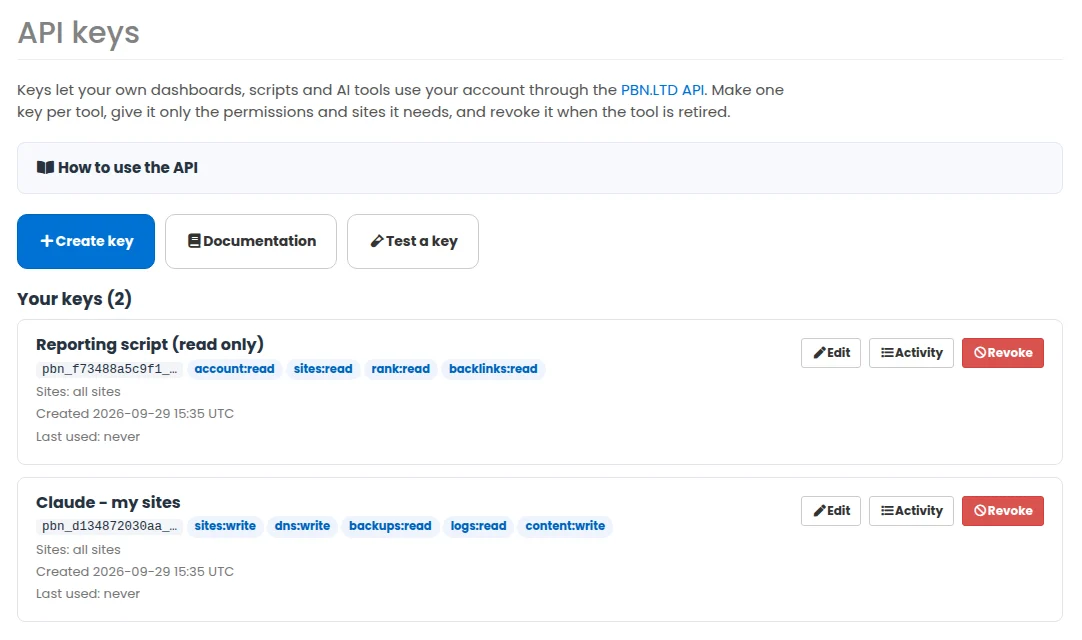
Keys you control
Create a key for each tool
Sign in and open API keys in your dashboard. Make one key per tool or assistant, so you can see what each one did and switch one off without touching the others. Every key has its own call log on its Activity page.
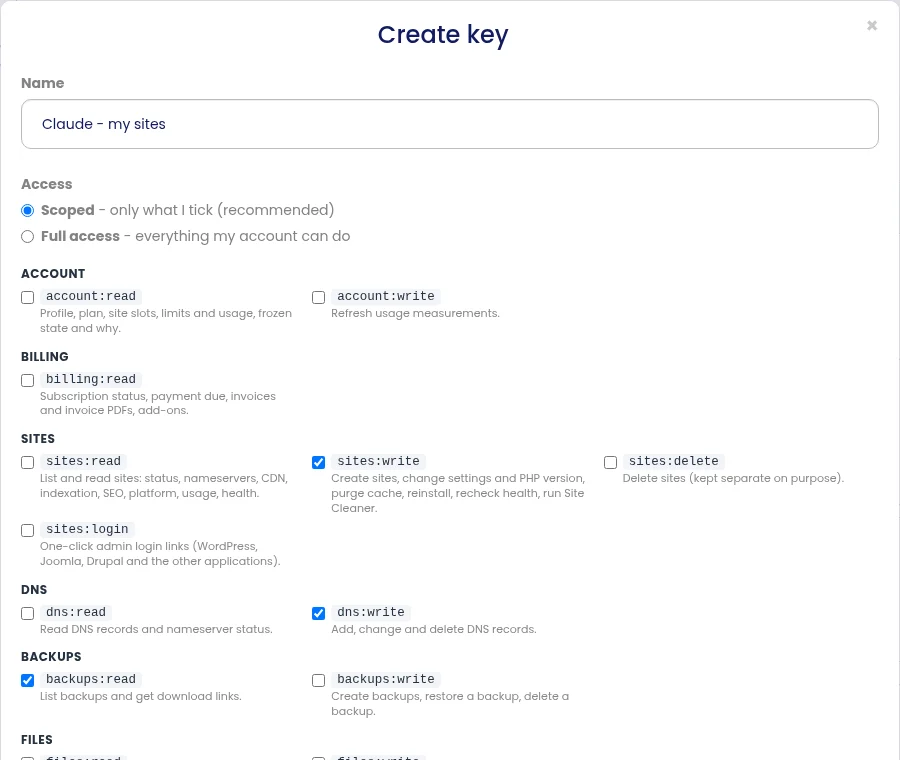
Give it only what it needs
Tick the areas a key may use — read or write, area by area — and, if you like, limit it to chosen sites, set an expiry date or allow only certain IP addresses. Deleting sites and one-click admin logins are separate permissions, so an assistant can change a site without being able to delete it. An assistant only ever sees the tools its key allows.
Everything is documented
The API documentation is public: authentication, permissions, limits, errors, a reference page for every area with examples, an OpenAPI file and an llms.txt your AI tools can read.
Ready-made jobs for your assistant
Once connected, your assistant can start from these (in Claude they appear under the + menu):
Diagnose a site
Work out why a site is down, slow, showing an error or paused, and say what to do about it.
Check a site is ready to go live
Nameservers, DNS records, CDN and HTTPS, with the exact steps left.
Build me a site
Create a site of any type, put the pages on it, set the home page and check it really serves.
Write and publish a post
On a site of any type, with its pictures, then check the published page.
Read the error log and fix it
Explain the errors in plain words and propose the safest fix — never changing a file without asking.
Review my account
Plan, what is owed, slots, usage, paused sites and anything that needs attention.
Your WordPress sites can be MCP servers too
Two of our own plugins on the WordPress sites we host give an AI app such as Claude, Cursor or VS Code direct access to the site itself, signed in as a WordPress user with an application password and limited to what that user may do.
Tranzly
74 abilities, 54 of them in the free plugin: list languages, translate a post or a page, check what is still missing, and with Pro translate in bulk and run the AI quality check. Its connection address is /wp-json/tranzly/v1/mcp on your site. How to connect an AI app to Tranzly.
Page Builder Sandwich
148 abilities, 52 of them in the free plugin: list, create and edit pages, add and move sections, apply kits and change the site design, and with Pro build many pages at once. Its connection address is /wp-json/pbs/v1/mcp on your site. How to connect an AI app to Page Builder Sandwich.
Who can use it?
Every PBN LTD account — the API and the MCP server are included at no extra cost. A key can only do what your account can do, and a key made by a team member through delegated access stops working the moment their access ends. Related: the SEO tools, client reports for agencies, and the mobile app for your account on your phone.
Questions people ask
What is an MCP server?
MCP (Model Context Protocol) is the open standard AI assistants use to work with other services. Our MCP server at https://app.pbn.ltd/mcp lets an assistant such as Claude, ChatGPT or Cursor use your PBN LTD account when you ask it to, with the permissions you approved.
Does it cost extra?
No. The API and the MCP server are included with your account. Anything you buy through them — a plan, an add-on, a domain — is priced exactly as in your dashboard and is only paid when you open the checkout link yourself.
Where do I get an API key?
Sign in and open API keys (https://app.pbn.ltd/api/keys/). Click Create key, give it a name, tick the permissions it needs and, if you like, the sites it may use. The full key is shown once: copy it into your tool straight away.
Do I need a key to connect Claude or ChatGPT?
Usually not. Add https://app.pbn.ltd/mcp as a connector and your assistant opens a PBN LTD login where you approve what it may do. A key is for clients that cannot log in that way, and for scripts that run on their own.
Can an assistant delete my sites?
Only if you allow it. Deleting sites is a separate permission from changing them, and every delete, restore or overwrite is marked as destructive so the assistant asks you first. Grant it only if you mean to, and keep a backup.
Can it see my password or card details?
No. It never sees your PBN LTD password, it cannot change your password, e-mail address or payment method, and it cannot reach any other customer’s account.
How do I disconnect an assistant?
On the API keys page, revoke the key or disconnect the app. The very next call it makes is refused.
Are there limits?
Yes, per key or connected app: by default 300 requests a minute, 10,000 an hour and 90 changes a minute — plenty for an assistant building a site or publishing posts. The exact limits for your key are in the documentation and are returned with every answer.
Is there a REST API as well?
Yes. The same actions are a JSON REST API at https://app.pbn.ltd/api/v1, with an OpenAPI description, so you can use them from your own scripts, dashboards and automation tools.
Let your AI assistant do the hosting chores
Guides: Do you have an API? · Connect any AI assistant to your account