
Money-site hosting runs the sites that earn on separate infrastructure from the PBN network. If one of your PBN sites has grown into a money site, you can move it across in one click, into a free site slot of a money-site plan you already have. You do not change nameservers, you do not touch your registrar and you do not copy anything yourself: the move runs by itself, checks every step, and only removes the PBN copy once the site is proven live on the new hosting.
💡 Buying a plan does not move a site by itself
Your PBN sites stay where they are until you choose which ones to move – one click each. We e-mail you how, with the list of your sites that fit, right after you buy a money-site plan.
Start a move
- Open your sites list and click the site you want to move.
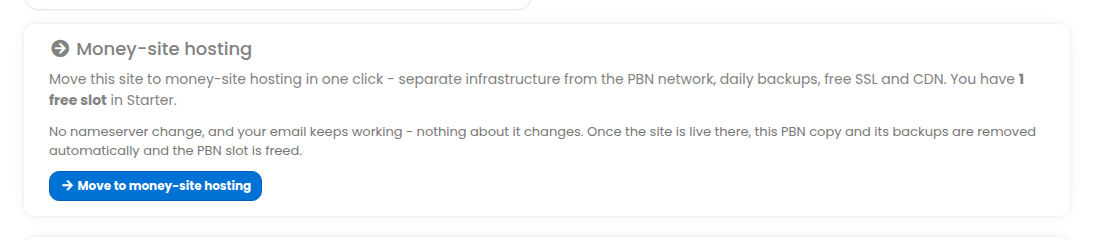
- On its Money-site hosting card press Move to money-site hosting. If you have free money-site slots, the top of your sites list also says so, with a link to this.
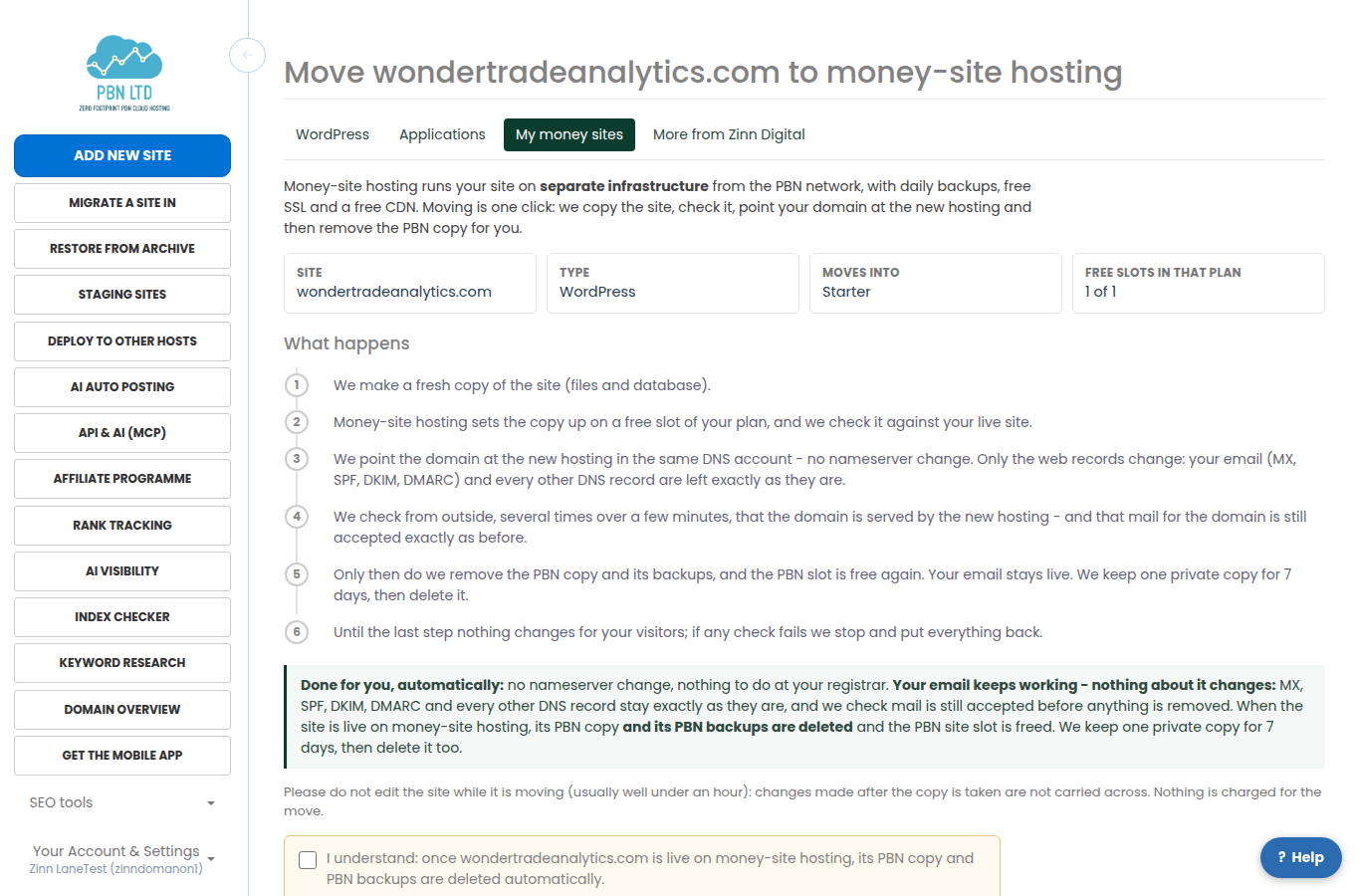
- Read what will happen, choose the plan to move into if you have more than one, tick the confirm box and press Move now.
What happens, step by step
- A fresh copy. We copy the site’s files and database.
- Set up on your plan. Money-site hosting sets the copy up on a free slot of your plan.
- Checked. We compare the copy with your live site – the page, its title, the login page, the database – before anything public changes.
- Domain pointed. We point the domain at the new hosting in the same DNS account it uses today (our Cloudflare, or your own Cloudflare or DNS account). Only the web records change: no nameserver change, and your email and every other DNS record are left exactly as they are.
- Proven live. We check from outside, several times over a few minutes, that the domain really is served by the new hosting.
- PBN copy removed. Only then is the PBN copy of the site, and its PBN backups, deleted automatically, and its PBN site slot is free again. We keep one private copy for 7 days, then delete it too.
If any check fails before the last step, we stop and put everything back: the site keeps serving from PBN hosting exactly as before, and we e-mail you. Nothing is charged for a move.
For 7 days after the move goes live, the site keeps a little extra disk space to cover the transition – the move page and My money sites show it, with the date it ends. After that, your plan’s normal space applies; nothing is deleted.
Your email keeps working
A move changes only the records that carry the web site. Before switching we take an inventory of everything else your domain uses – mail (MX), SPF, DKIM and DMARC records, mail set-up names, verification records and any other names in the zone – and it must read back exactly the same afterwards. Every outside check also asks the mail server whether mail for the domain is still accepted, exactly as it was before the move (a check only – no message is sent into your mailbox). Mailboxes on our mail service stay where they are and keep receiving. If anything about mail changed, the move stops and puts everything back.
Follow the move
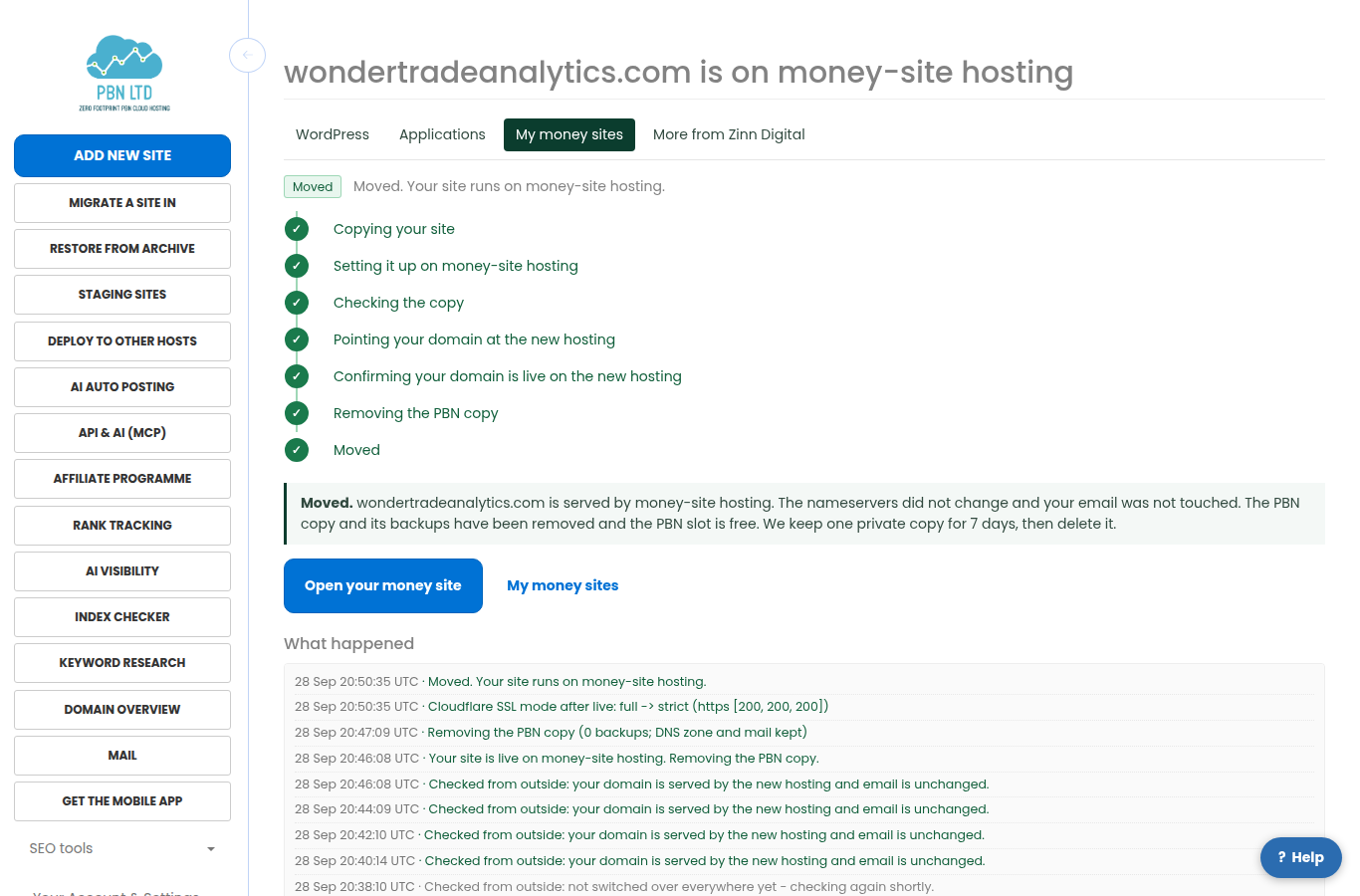
The move page shows each step and a log of every check, and updates by itself. A move usually takes well under an hour. There is no size limit: a big site simply takes longer, and while its copy is made and set up the page shows how much has been copied and what money-site hosting is doing (a very big site may wait its turn for room – nothing is wrong). You can close the page – we e-mail you when it is done. All your moves are under Money-site hosting > My money sites > Moves. Until the domain switch starts you can cancel, and nothing changes. Please do not edit the site while it moves: changes made after the copy is taken are not carried across.
Which plan a site moves into
- WordPress sites move into a Managed WordPress plan (Starter, Plus or Pro).
- Static HTML and plain PHP sites also move into a Managed WordPress plan.
- Joomla, Drupal, PrestaShop, OpenCart and MediaWiki sites move into that application’s Application hosting plan – a Joomla site never goes into a WordPress plan.
- Grav sites cannot be moved yet.
No plan for that type yet, or every slot in use? The same button says so and offers Upgrade this site to money-site hosting: it takes you to the right plan, and after paying you come straight back to the move.
A plan or free trial starts with one empty starter site – a placeholder with no content of your own. If that placeholder is the only free slot in the plan, the confirm screen says the move “replaces your empty starter site” – that is expected, and you lose nothing.
On a free trial: you can move a site straight in while the trial is running – it usually replaces the trial’s empty starter site, and no separate pending order is ever needed. If the trial is not subscribed before it ends, the site on money-site hosting is paused then suspended along with the trial, exactly like any other trial site – subscribe before the trial ends (how the free trial works) to keep it. Moving a site never costs anything beyond the plan or trial you already have.
After the move
- The site appears under My money sites, where you manage it.
- You manage it in the Zinn Digital control panel: we e-mail you an invitation – accept it to get in. WordPress admin stays at https://your-domain/wp-admin/ with the same WordPress login as before. Managing your money site: the control panel and WordPress admin.
- Your domain keeps its nameservers and DNS account; your email keeps working.
- Paid add-ons of the PBN copy (extra disk, hourly backups) end when it is removed; nothing is refunded for them.
- The PBN site slot it used is free again for another PBN site.
If a move stops

If a move cannot finish, it stops before anything public changes (or puts the domain back), so your site is unchanged and nothing is charged. The move page, the site’s page and the e-mail we send all say what to do next, with a button: for example, when every site slot in your plan is in use, add another plan or upgrade your plan, then press Move again. Once you have done it, press Try the move again. If the cause was on our side, our team has already been told and will contact you.
When a site cannot move by itself
A few sites cannot use the one-click move yet, and the button says why: a site whose DNS is managed somewhere we cannot reach, a site that other sites use as their parent domain (move those subdomain sites first), a site with extra databases, a Cloudflare zone set to “Flexible” SSL, or a very large site. Contact support and our team moves those for you.