
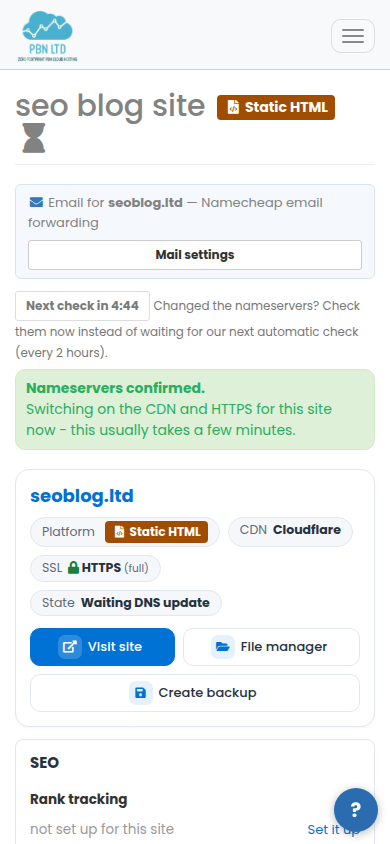
A new site goes live once your domain uses the nameservers shown on its page. Until then the site shows Waiting DNS update (and, for a short while after that, Activating CDN). We check every waiting site by ourselves – every few minutes at first, then about every 2 hours – so a site always goes live on its own. If you have just changed the nameservers and do not want to wait, press Check again now.
💡 The short version
Open your sites list or the site’s page and press Check again now. In a few seconds you see what is holding the site: the nameservers still need changing (with the exact names), an old DNSSEC setting or a status at the domain registry is blocking it (with the steps), or everything is right and the site is going live now.
Where the button is
The button is on the card of every site that is waiting for its nameservers or finishing its CDN, in your sites list, and near the top of the site’s own page.

What it checks
- What your registrar really publishes. We ask the registry of your domain ending directly – the same place every visitor’s lookup ends up – not a cached copy.
- Whether those are the nameservers shown for the site. They must match exactly.
- An old DNSSEC setting left at your registrar by the DNS service the domain used before. It stops the site loading for most visitors even when the nameservers are right.
- Your domain’s status at the registry – whether it is on hold, expired, in its redemption period, about to be deleted, locked against changes or being transferred. Ordinary transfer locks are normal and are not reported.
- The last step. When everything is right, the site’s go-live step starts at once instead of at our next scheduled check.
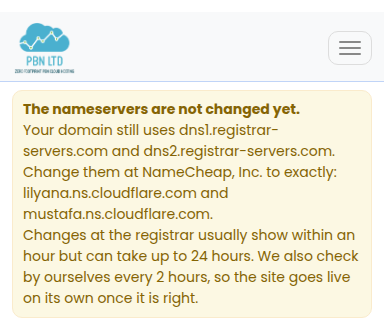
Answer: the nameservers are not changed yet
You see the nameservers your domain uses today and the ones it must use, and which registrar holds the domain. Change them at your registrar (or connect your registrar account so we do it for you), then check again.
A change at the registrar usually shows within an hour but can take up to 24 hours. You do not have to keep pressing: we keep checking by ourselves, and the site goes live on its own.

Answer: an old DNSSEC record is blocking it
The nameservers are right, but your registrar still has DNSSEC switched on for the domain, made for the DNS service it used before. Switch DNSSEC off (delete the DS record) at your registrar – the answer shows the steps for your registrar. Full guide: Site stuck activating: remove old DNSSEC.
Answer: the domain is blocked at the registry
Your domain is on hold, has expired, is in its redemption period or about to be deleted – or it is locked while the nameservers still need changing. No setting on our side can change that; the answer says which status it is and what to do at your registrar. Full guide: Site blocked at the domain registry.
Answer: all good – your site is going live
The nameservers are right and nothing blocks the site, so the go-live step starts straight away. The page updates by itself; when the site is live it reloads.

How often you can check
Each site can be checked once every 5 minutes, and an account can run up to 10 checks an hour. The button shows when the next check is allowed. This keeps the checks fast for everyone – and the answer rarely changes within a few minutes anyway.

Ask the assistant
The assistant in your dashboard (the help button, then choose the site) can run this same check for you: ask “why is my site not live?” and it answers with what your registrar publishes right now and what to do next. It shares the button’s limit. The chat on our website cannot look at your sites – sign in to use it.
Still waiting?
If the check says everything is right but the site is still not live after a few hours, open a support ticket and tell us the domain – we look at it straight away.