
Performance Boost gives every site in your account extra CPU and memory at once: 1.5x, 2x or 3x what they run with on our standard hosting. It is made for heavier plugins and page builders, WooCommerce, busy traffic spikes and faster crawling and indexing. It covers the whole account, including sites you add later, and there is nothing to set up.
💡 Where to find it
Click PERFORMANCE BOOST in the menu on the left of your dashboard, or the Performance Boost tile on any site’s page. The page is app.pbn.ltd/performance-boost/.
Choosing a level and paying
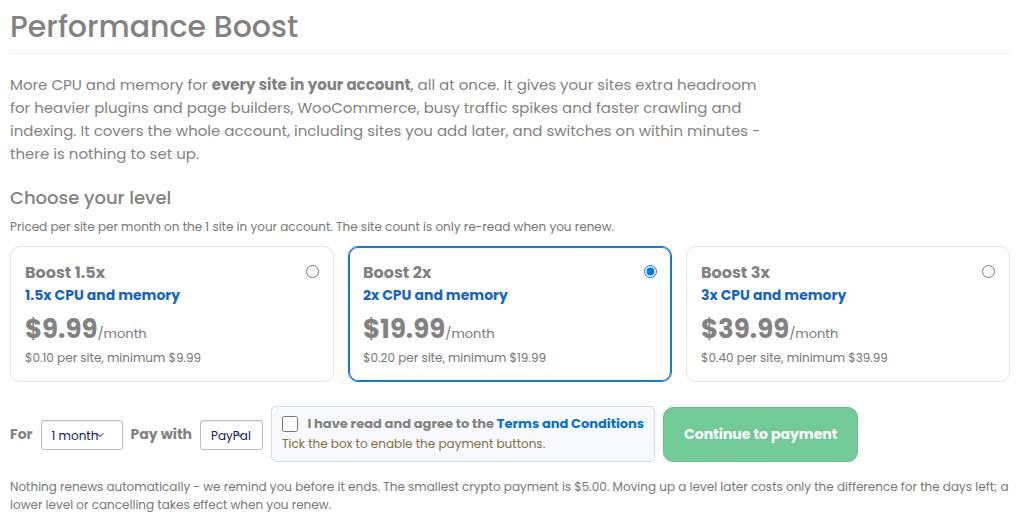
- Open Performance Boost.
- Pick 1.5x, 2x or 3x. Each level shows its monthly price already worked out for the number of sites in your account.
- Choose 1, 3, 6 or 12 months and how to pay (PayPal, which also takes cards, or crypto), tick the Terms box and press Continue to payment.
- Within a few minutes of the payment every site in your account runs with the extra CPU and memory. The page shows On for all your sites.
How the price is worked out
The boost is priced per site per month, with a small monthly minimum, on the number of sites in your account when you pay. Sites you add during the paid period get the boost too, at no extra cost; the site count is only re-checked when you renew. The exact price for your account is always on the page before you pay.
While it is on
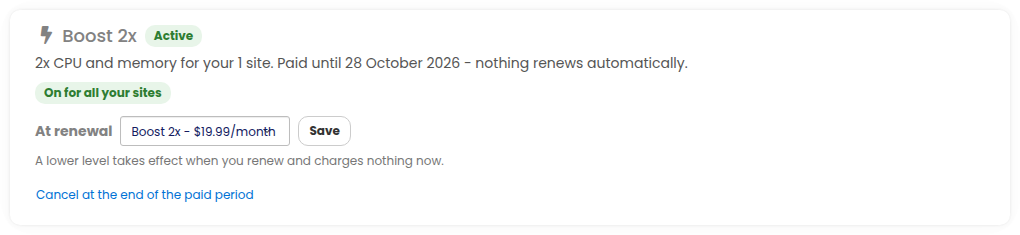
- On for all your sites – every site has the extra CPU and memory.
- Switching on – it is being applied; this takes a few minutes.
- Almost there – most sites already have it and we are finishing the rest; our team is told automatically.
Moving up or down a level
- Up: press Upgrade on the higher level. You pay only the difference for the days left in your paid period, and your sites get it within minutes.
- Down: choose the lower level under At renewal and press Save. Nothing changes and nothing is charged until you renew.
Renewing and cancelling
Nothing renews automatically. A week before your boost ends we e-mail you the renewal price for the sites you have then; renew from the same page. To stop, press Cancel at the end of the paid period: the boost stays on until then, and afterwards your sites simply go back to our standard hosting. Nothing more is charged, and paid time is not refunded.
On each site’s page

Every site’s page has a Performance Boost tile that opens the same page – the boost is for the whole account, so you do not switch it on site by site.