
DNSSEC is a registrar setting that tells the internet which keys signed your domain’s DNS. When a domain moves to new nameservers, the old DNSSEC record (a DS record) still describes the old DNS service. Every lookup then fails the check, most visitors cannot reach the domain at all, and the site stays in Waiting DNS update or Activating CDN.
💡 The short version
Sign in at your domain registrar, open the domain’s DNSSEC (or “DS records”) setting, and switch DNSSEC off or delete every DS record. Do not change the nameservers. The site goes live by itself, usually within a few hours – or press Check again now on the site.
How you know
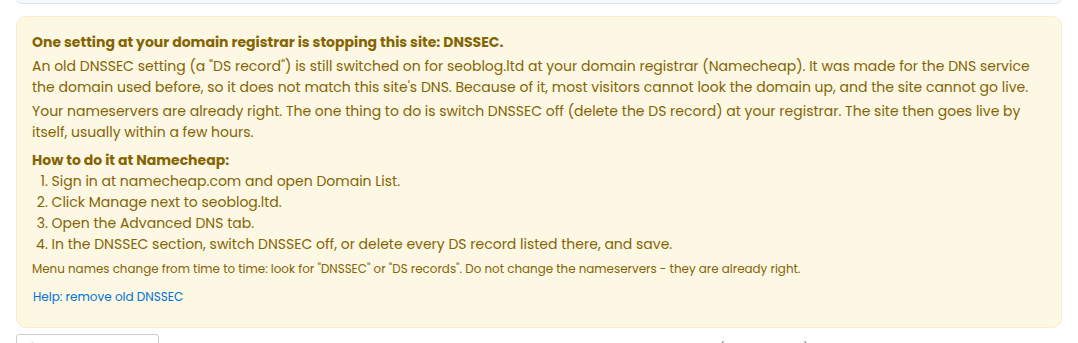
The site page shows a yellow notice starting One setting at your domain registrar is stopping this site: DNSSEC, with the steps for your registrar, and we send you one e-mail about it. Check again now gives the same answer.
Why it happens
Your previous DNS service had DNSSEC switched on and published its key at the registrar. The nameservers were changed, but the key was not removed. The new DNS does not use that key, so resolvers that check DNSSEC – most of them today – refuse to answer for the domain.
How to remove it at common registrars
- Namecheap: Domain List → Manage next to the domain → Advanced DNS → DNSSEC: switch it off, or delete every DS record.
- GoDaddy: Domain Portfolio → the domain → DNS → DNSSEC (DS records): delete every record.
- Porkbun: Domain Management → Details → DNSSEC: delete every DS record.
- NameSilo: Domain Manager → the domain → DNSSEC: delete every DS record.
- Dynadot: My Domains → Manage Domains → the domain → DNSSEC: remove the DS record.
- Name.com: My Domains → the domain → DNSSEC Management: delete every record.
- Any other registrar: open the domain’s settings and look for “DNSSEC” or “DS records”; switch DNSSEC off or delete every DS record.
Menu names change from time to time. If you cannot find it, ask your registrar’s support to “remove the DS records / disable DNSSEC” for the domain.
What happens next
Registries publish the change within minutes to a few hours. We keep checking by ourselves and the site goes live on its own; press Check again now on the site to check at once (see My site is waiting for DNS – check it now).
Nothing on your site is lost while it waits.
Still stuck?
Open a support ticket with the domain name and we will check it with you.