
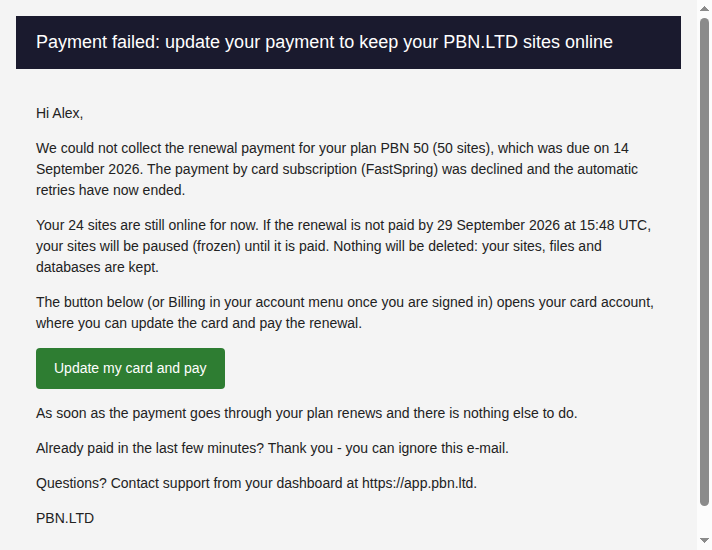
When you pay by card subscription or PayPal subscription, each renewal is charged automatically. If a renewal is declined, the payment provider retries it for a while. If every retry fails, we e-mail you once: the payment failed, how to pay, and the date your sites will be paused if it is still unpaid – 3 days later.
💡 Nothing is ever deleted
A paused (frozen) site keeps all its files, databases and settings. It simply stops serving until the renewal is paid, then comes back online by itself.
The e-mail you receive
The subject starts with Payment failed. It names your plan, the date the renewal was due, and the exact date and time (UTC) your sites will be paused if it is still unpaid. Until then your sites stay online as normal.
How to pay
- Card subscription: press Update my card and pay in the e-mail, or sign in and choose Billing in your account menu. It opens your card account, where you can update the card and pay the renewal.
- PayPal subscription: press Pay now in the e-mail, or open Subscriptions in your account menu. You can also choose another payment method there.
As soon as the payment goes through your plan renews. There is nothing else to do.
If the date passes without payment
Just before pausing we check with the payment provider once more, so a payment made at the last minute is never missed. If it is still unpaid, your sites are paused and you get one more e-mail saying so. Each paused site shows Paused: plan not paid in your Sites list, and visitors see a “not available” page.
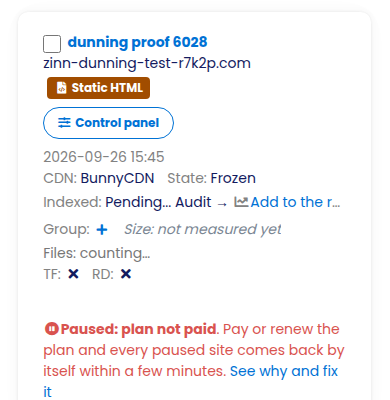
Pay the renewal and every paused site comes back online by itself, usually within a few minutes. Your files, databases and settings are exactly as you left them.
Need more time or something looks wrong?
Open a support ticket before the date in the e-mail and tell us what is happening – for example if you have already paid another way. Our team can hold the pause while it is sorted out.