
From time to time the server a site is on has scheduled maintenance – for example a planned restart after updates. While it is under way the site, its File manager and the one-click admin login can be unavailable for a few minutes.
💡 Nothing to do on your side
The site comes back by itself. The notice shows the time it will be back by, in UTC and London time, and disappears as soon as the server answers again.
Where you see it
On the site’s page, at the top:

And on the site’s card in your sites list:
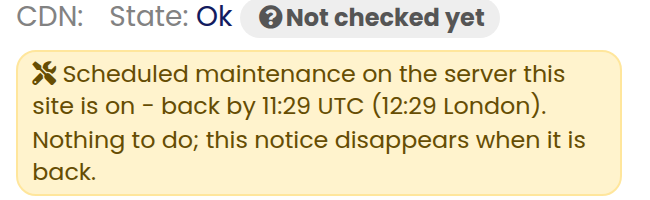
If you press the one-click admin login while it is under way, the same message is shown instead of the login.
When it is not planned
If a server has an unexpected problem, the notice says we are fixing a problem with the server this site is on. Our team is already on it; the site comes back as soon as it is fixed and the notice disappears.
Check the service status page
Our service status page lists every planned maintenance window – the one under way now and the ones coming up – with its times in UTC and London time. You do not need to sign in to see it.
Maintenance of the control panel itself is listed there too. During it the dashboard can show a switching servers page for a few minutes; your websites are not affected and nothing needs doing.
If you have already opened a ticket
Our support tells you the server is having scheduled maintenance and keeps your ticket open. As soon as it is back we check your site – and, if you wrote about the File manager or the admin login, that it works again – and update the ticket. The assistant in your dashboard can also tell you whether the server your site is on has maintenance right now.