Every live site you host with us comes with its SEO figures from the leading providers, measured for you and included free on every PBN hosting plan: the Ahrefs Domain Rating, the Majestic Trust Flow, Citation Flow and referring domains, the Moz Domain Authority, Page Authority and Spam Score, and an automatic Google indexing check. Most hosts include none of this, so you would normally pay for your own Ahrefs, Majestic and Moz subscriptions just to watch your own network. Add one-click domain changes and you can spot a weak or dropped domain and replace it in minutes.
💡 Nothing to switch on
The figures appear by themselves once a site is live and its nameservers point to us. They are measured for sites on a paid plan; during a free trial they start as soon as you pay.
Where you see them: the site card
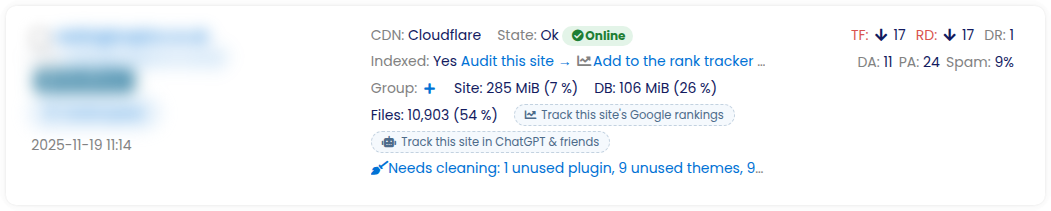
Open Your sites. Every site card shows, on the right, TF (Majestic Trust Flow), RD (referring domains, from Majestic) and DR (Ahrefs Domain Rating), with DA, PA and Spam (Moz) on the row below, and in the middle Indexed: Yes / No / Pending. An arrow next to TF and RD shows whether the figure went up or down at the last refresh.
All the figures on the site page
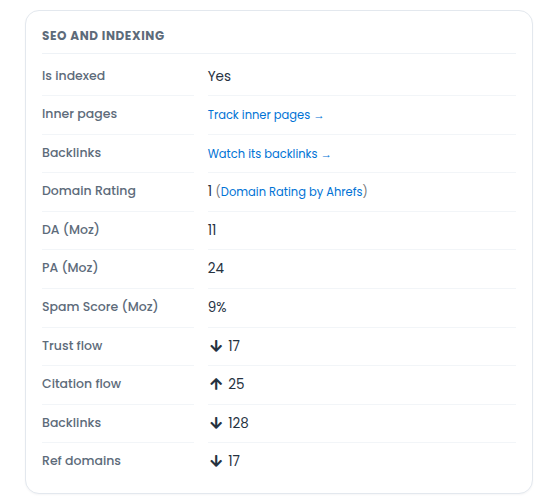
Open a site (its Control panel). The SEO and indexing box lists everything we measure for it: Is indexed, Domain Rating (Ahrefs), DA, PA and Spam Score (Moz), Trust flow, Citation flow, Backlinks and Ref domains (Majestic), each with its change since the last reading. The site’s SEO metrics charts tab shows how the Majestic figures moved over time.
What each figure means
- Domain Rating (DR) – Ahrefs’ 0–100 score for the strength of a domain’s backlink profile. Read three days after you add a site, then refreshed every month.
- DA, PA and Spam Score – Moz’s Domain Authority (1–100, the whole domain), Page Authority (1–100, the homepage) and Spam Score (the share of similar sites Moz found penalised or banned – lower is better). Read three days after you add a site, then every month; a domain Moz does not know yet is tried again after 7, 14 and 30 days.
- Trust Flow (TF) – Majestic’s 0–100 score for how trustworthy the sites linking to yours are. Refreshed every week.
- Citation Flow (CF) – Majestic’s 0–100 score for how much link equity points at the domain, whatever its quality. A CF far above TF can mean spammy links.
- Backlinks and Ref domains – how many links Majestic has found and from how many different domains. Refreshed every week.
- Indexed – whether Google has the site in its index (see below).
Automatic Google indexing checks
- A new site is first checked 48 hours after it goes live, to give Google time to find it.
- An indexed site is re-checked every month; a site that is not indexed is re-checked every week.
- A site is only marked not indexed after a second search 48 hours later confirms it – then we e-mail you, so a drop-out never goes unnoticed.
- In Your sites, the Indexed filter lists sites that are indexed, not indexed or not checked yet.
- Want to know about individual pages rather than the whole domain? The Index Checker checks page by page.
Replace a weak or dropped domain in one click
If a domain loses its index or its metrics fall away, you do not have to rebuild the site. Open the site, press Edit and enter the new domain: the site, its content and its database move to it, and the new domain’s figures start to be measured. The same Edit page switches between www and non-www or http and https, and the bulk bar in the sites list does that for many sites at once. How to change the URL of your website.
Which plans include this
All of it is included on every PBN hosting plan, from the smallest to the largest – our plans differ only in how many sites they allow, never in features. There is nothing to buy or switch on. See every hosting feature and the plans.