
If one of your sites goes over a usage limit — its database size, disk space or number of files — we pause it to keep the server healthy for everyone. The good news: you don’t have to wait for us or buy more space straight away. You can switch the site back on yourself for 30 minutes, clear out what’s taking up the room, and it goes back online once you’re under the limit.
💡 Heads-up
This self-unfreeze is only for sites paused because they’re over a usage limit. It gives you a 30-minute window (up to 3 times a day) to tidy up in WordPress, phpMyAdmin or the File Manager. When the window ends we re-check — if you’re back under the limit, or you’ve added space, the site stays online.
How you’ll know your site is paused
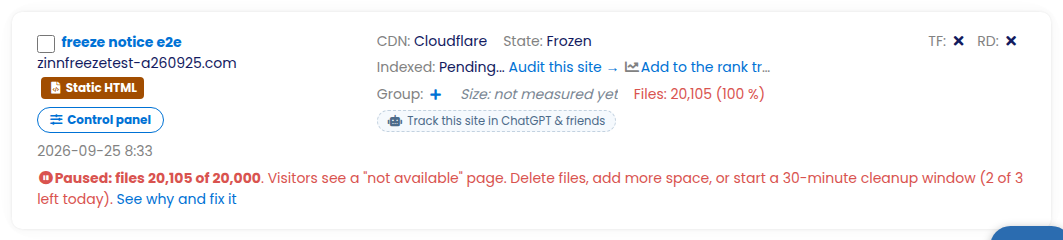
A site that’s over a limit shows as Frozen on your Sites list, with a red line that gives the exact figures — for example “Paused: files 20,105 of 20,000” — tells you what visitors see, how many cleanup windows you have left today, and a See why and fix it link.
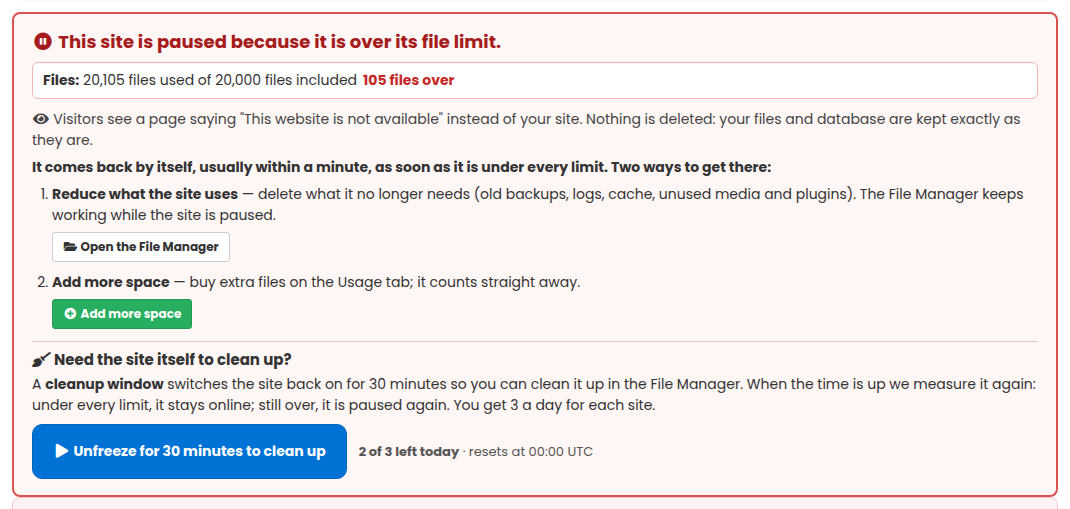
Click See why and fix it (or just open the site). At the top of the site page — and on its Usage & add-ons tab — a red box says in plain words why the site is paused, for example “This site is paused because it is over its file limit”, with how much is used, how much is included and how far over it is (for example “Files: 20,105 used of 20,000 included — 105 over”). It also tells you what your visitors see while the site is paused: a page saying “This website is not available”. Nothing is deleted.
The same box lists the ways out: delete what the site no longer needs (the File Manager keeps working while the site is paused — there is a button for it), or press Add more space, which opens the buy form on the Usage tab for exactly the limit that is over. As soon as the site is under every limit it comes back by itself, usually within a minute.
Unfreezing your site to clean it up
If you need the site itself switched on to clean up (WordPress, phpMyAdmin), click “Unfreeze for 30 minutes to clean up” at the bottom of the red box. Your site comes straight back online for 30 minutes so you can get in and remove what you don’t need. You get this 3 times per site per day (the count resets at midnight UTC — the box shows “n of 3 left today”, and when none are left it tells you when the next ones are available).
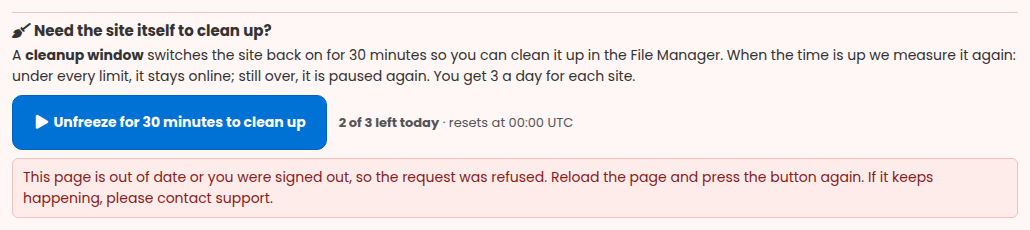
If a window cannot start — for example all three have been used today, or the page was open so long that you were signed out — the reason is shown right under the button, so you always know what to do next.
While the window is running you’ll see a countdown and a Check now button, which re-measures the site within about a minute — handy so you don’t have to wait out the full 30 minutes once you’re done. You’ll also get emails when the window starts, when there are 10 minutes left, and with the result.
What to clear out
Use the 30 minutes to bring the site back under its limit. Depending on what’s over:
- Database too big: delete spam comments, old post revisions, trashed content, and leftover tables from plugins you’ve removed (in phpMyAdmin, or a cleanup plugin).
- Disk or files too high: remove old backups, unused media and files you no longer need (in the File Manager). Our own platform plugins (Tranzly, Page Builder Sandwich, Zinn Footprint, Zinn Cache and Zinn Chat) are not counted, so removing them would not help — leave them in place.
The quickest way is Site Cleaner, our add-on that clears exactly this kind of clutter — unused plugins and themes, old revisions, spam, logs, cache and leftover database tables — in one go. You’ll see it offered right there in the red box.
When the 30 minutes are up
When the window ends — or the moment you press Check now — we measure the site again:
- If you’re under every limit (or you bought more space during the window), the site stays online.
- If it’s still over, it’s paused again, exactly as before. You can start another window, up to your 3 a day.
Or just add more space
If cleaning up isn’t enough, or you’d simply rather not, you can buy more of whatever you’re short on — database, disk or files — and the site comes straight back online. See Usage & Add-ons – Buy Extra Usage.
✅ Quick summary: If a site is paused for going over a usage limit, you can fix it yourself. On your Sites list click “See why and fix it”, then “Unfreeze for 30 minutes to clean up” (up to 3 times a day). Clear the bloat in WordPress, phpMyAdmin or the File Manager — Site Cleaner does this in one go — then press Check now or wait for the window to end. If you’re back under the limit it stays online; if not, add more space and it comes right back.