
Staging sites · test first, then go live
A private staging copy of your site — try every change there first, then copy it to live
Updating plugins, changing theme, redesigning a page or testing a new checkout on a live site is how sites break in front of visitors. A staging copy is a private duplicate of your site on the same server, where you make the change, look at it, and only then copy it to the live site — the files, the database, or both. Search engines never see it.
- $9/month, whole account
- Up to 10 staging sites at once
- Live → staging and staging → live
- Full, database only or files only
- Never indexed
- 7-day undo on every publish
Already a customer? Open Staging sites in your dashboard. Prefer to read the steps first? Read the full how-to guide.
What it changes
Updates stop being a gamble
Run the plugin, theme and WordPress updates on the staging copy first. If one of them breaks the site, it breaks the copy — your visitors never see it, and you decide what to do about it in your own time.
Redesign without an audience
Build the new homepage, the new menu or the new theme on the copy, show it to a colleague or a client with its own password, and publish it to the live site in one step when it is right.
Only what you choose goes live
Copy everything, only the database (content, settings, users), or only the files (themes, plugins, uploads). Pull the latest posts or orders from live into staging the same way before you start.
Search engines never see it
A staging copy is password-protected, answers every request with a noindex header, blocks every crawler in its robots.txt and has WordPress set to discourage search engines. None of that ever reaches your live site.
How it works
Create a staging copy in one click
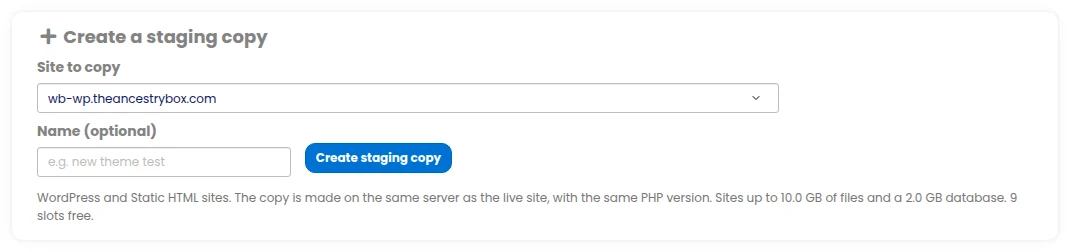
Choose one of your WordPress or Static HTML sites and press Create staging copy. We copy every file and the whole database to a private address on the same server, with the same PHP version, and change every address of the live site inside the database — including the ones page builders keep in their own formats — to the staging address.
A typical WordPress site is ready in about a minute; the page updates by itself.
Work on it with the tools you already use
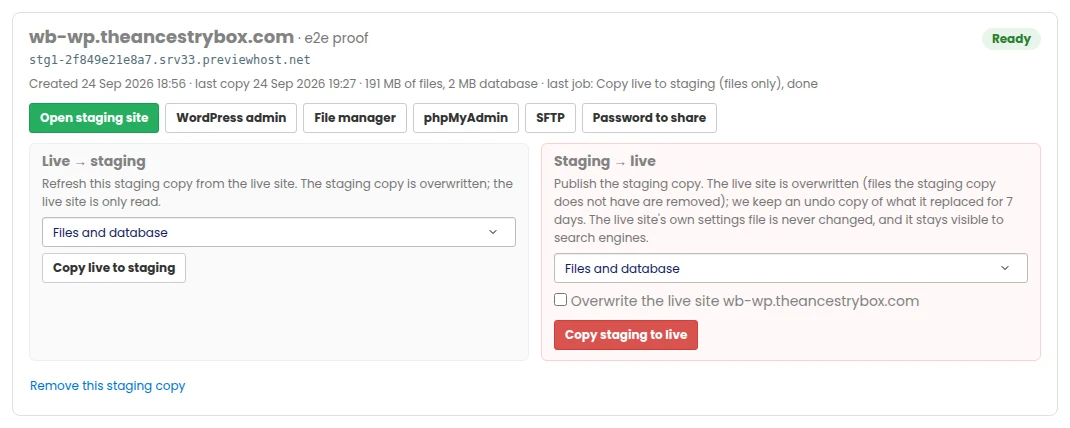
Open staging site unlocks the copy in your browser. WordPress admin logs you straight in. The file manager, phpMyAdmin and SFTP work on the staging copy’s own files and database — the SFTP login only ever sees the staging folder.
A staging copy sends no e-mail, so a test order or a contact-form test never reaches a real person, and the WordPress admin bar shows a red STAGING COPY badge so you always know where you are.
Copy it to live — all of it, or just part
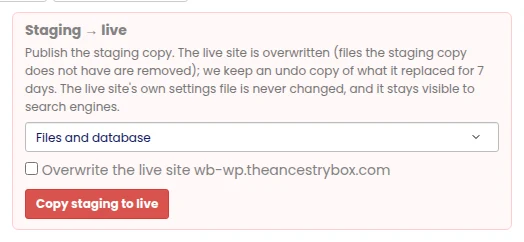
Choose Files and database, Database only or Files only, tick the box and publish. The live site keeps answering while it runs; a database is switched over in one step, already carrying the live addresses, so no visitor ever lands on a page that points at the staging copy. We then clear the live site’s page cache and its CDN cache.
The live site’s own settings file never changes, its search-engine setting is put back exactly as it was, and an undo copy of everything that was replaced is kept for 7 days.
Which sites can have a staging copy
WordPress: everything above, files and database. Static HTML: the files (a static site has no database). WordPress multisite, and the other site types, are not offered yet — their configuration files carry the database and the address in each platform’s own format, and we would rather not offer a copy we cannot make exact.
One price for your whole account
In US dollars, plus VAT where it applies. Pay for 1, 3, 6 or 12 months with PayPal (which also takes cards) or with crypto (from $5).
Staging
- Up to 10 staging sites at the same time
- Of the same site or of different sites
- Remove one and make a new one whenever you like
- Live → staging and staging → live
- Full, database only or files only
- WordPress admin, file manager, phpMyAdmin and SFTP
- Never indexed, no e-mail sent
- Cancel any time — nothing renews automatically
The $9 is billed monthly, or for 3, 6 or 12 months at once. Nothing renews automatically. If it ends, your staging copies are paused and removed 14 days later unless you renew; cancelling removes them straight away. Your live sites are never touched. Months already paid for are not refunded.
Do you need a hosting plan with us?
Yes. A staging copy lives on the same server as the site it copies, so staging is for sites you host with us. If you already host with us, adding staging to your account is all you need.
Questions people ask
How much does it cost?
$9 a month, plus VAT where it applies, for your whole account — up to 10 staging sites at the same time. Pay for 1, 3, 6 or 12 months with PayPal (which also takes cards) or with crypto (from $5). Nothing renews automatically; we remind you before it ends.
Can search engines find my staging site?
No. Every staging copy is behind a password, every answer carries a noindex header, its robots.txt blocks every crawler, WordPress is set to discourage search engines, and the address itself is a private one that is linked from nowhere.
Will copying to live make my live site noindex?
No. The staging protections are never copied: the live site’s own settings file is not touched, the staging marker is left behind, every staging address in the database is replaced with the live one, and the “discourage search engines” setting is put back to exactly what the live site had.
What exactly do “database only” and “files only” copy?
Database only: posts, pages, settings, users, orders — everything WordPress keeps in its database. Files only: themes, plugins, uploads and every other file. Files and database: both, so the live site becomes the staging copy.
Is there an undo?
Yes. Before anything on the live site is overwritten we keep a copy of the live database and of every file that is replaced or removed, for 7 days. If a copy to live was a mistake, contact support and we put the live site back as it was.
Does my live site go down while I publish?
No. The live site keeps answering throughout. The new database is prepared in the background with the live addresses already in it and switched over in one step at the end.
Does a staging copy send e-mail?
No. A staging copy sends no e-mail at all, so testing a checkout, a form or a password reset never reaches a real customer.
Can I show the staging copy to a client?
Yes. Each staging copy has its own username and password to share; whoever has them can look at it, and nobody else can.
What happens if I remove a staging copy, or cancel?
Removing a copy deletes its files and database and frees its slot at once, so you can make a new one. Cancelling removes every staging copy. Your live sites are never touched.
Which kinds of site are supported?
WordPress (files and database) and Static HTML (files). WordPress multisite and the other site types are not supported yet.
Is a staging copy backed up?
A staging copy is a copy, so it is not backed up separately. Your live site keeps its normal backups, and every copy to live keeps a 7-day undo copy of what it replaced.
Stop testing changes on your live site
$9 a month for your whole account, up to 10 staging sites at once, never seen by search engines.
Also useful: Redis – a private cache that makes your sites faster · Copy a staging site to live