
Quick summary: If your card payment is being declined at checkout with the message “We regret that your order could not be accepted”, the block is coming from our payment provider (Fastspring), not from PBN LTD. The quickest fixes are to try a different card, or switch to PayPal or crypto — full steps below.
What error am I seeing?
When trying to pay with a credit or debit card on PBN LTD, you may see the following message:
“We regret that your order could not be accepted. We value your business and would like to help you complete this order. Please contact us for assistance.”
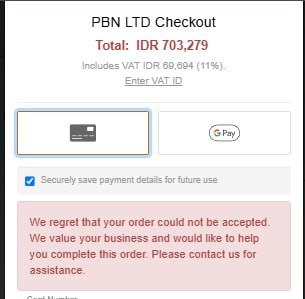
This message comes from Fastspring, our secure payment processor — not from PBN LTD.
Why is my card being declined?
Fastspring doesn’t share the exact reason with us, but the most common causes are:
- Mismatched details — your billing country, card origin, and IP address don’t all match.
- Card not in your name — Fastspring blocks third-party card use for fraud prevention.
- Bank-side block — your bank or card issuer declined the transaction under their anti-fraud rules.
How to complete your payment
You have a few options, in order of how quickly they usually work.
1. Try a different card
Before switching payment methods, it’s worth trying another card if you have one available. A different card (especially one issued in the same country as your billing address) will often go through without any other changes.
2. Pay with PayPal (recommended)
- Open the Subscriptions page in your PBN LTD dashboard.
- Click the link at the top of the page to switch to PayPal.
- Choose one of the following:
- Pay with your PayPal account, or
- Pay with a credit/debit card using PayPal’s “Credit/Debit card” option — you do not need a PayPal account to use this.
Most customers who hit the Fastspring error complete payment successfully this way.
3. Pay with crypto (one-time payments)
Crypto is supported for one-time payments. At checkout you can choose BTC, USDT, or other supported coins.
4. Contact Fastspring support
If you want to know exactly why your card was declined, contact Fastspring directly at fastspring.com/contact.
Hosting add-ons: pay by card through FastSpring if PayPal refuses your card
Hosting plans, renewals and every hosting add-on (extra disk, database space or files on a site’s Usage tab, extra databases, hourly backups, PBN Performance Boost, Redis, staging, extra site slots, CDN bandwidth upgrades, mailboxes, Deploy to other hosts and Site Cleaner) can be paid by card through FastSpring, by PayPal or by crypto. If PayPal’s card form does not accept your card for an add-on, choose Card via FastSpring under Pay with and complete the payment on FastSpring’s secure page. If a FastSpring card payment is declined, PayPal or crypto are the alternatives.
Marketplace orders (backlinks, link packages, PBN builds, articles and site services) can be paid with PayPal — including PayPal’s card option — or with crypto. Card payment through FastSpring is not available for marketplace orders, because FastSpring’s terms do not cover selling these services.
Aged domains, Wayback restores and the SEO tools take the same three methods: card through FastSpring, PayPal (including PayPal’s card option) or crypto. Choose Card via FastSpring on the domain’s Buy button, on the restore or restore-pack page, or under Pay with in the SEO tools checkout. SEO tools paid by card through FastSpring renew automatically every period until you press Stop automatic renewal on your SEO tools subscription page.
Need more help?
- This error is not caused by PBN LTD or our billing system.
- If your card is valid and still won’t go through, a different card, PayPal, or crypto are reliable alternatives.
- Still stuck? Open a support ticket.