
Every WordPress site you host with us keeps its core and its plugins up to date automatically. That part is not unusual. What is unusual is that we check whether your site still works afterwards – and put the update back if it does not. You are never left choosing between running out-of-date software and risking a site that breaks while you are not looking.
💡 You do not have to do anything
This runs on every WordPress site automatically. There is nothing to switch on, nothing to configure, and in the ordinary case – where the updates are fine – you will never hear from us about it at all.
Why an automatic update can break a site
A WordPress site is your theme, your plugins and WordPress itself, all running together. Most of the time a new plugin version slots straight in. Occasionally one does not: a new release expects a newer version of something else on the site, or changes something a paid add-on was relying on, and the site stops loading. It is nobody’s fault in particular – it is what happens when independently written software has to work together.
The dangerous part is not the incompatibility. It is not finding out. Most hosting that offers automatic updates applies them and moves on, so the first sign of a problem is a visitor, a client, or a drop in rankings – days later. That is exactly why a lot of hosts do not offer automatic updates at all, and leave the risk with you instead.
What we check, and when
Around every update we do four things:
- We load your site first. Not a quick ping – we load it the way a visitor does, with your real theme and every one of your plugins running, and confirm it works. If your site was already broken before we touched anything, we say so and blame nothing on the update.
- We note the version of every plugin as it stands right now, so we can get back to it exactly.
- We apply the updates.
- We load your site again, the same way. Almost always it is fine, and that is the end of it.
What happens if an update breaks your site
Your site goes back to working immediately. Every plugin we had just updated is put straight back to the version it was on a moment earlier, and we load the site again to prove it is serving. In practice this happens in seconds – long before a visitor would notice.
Then we find out which one was responsible. The updates are re-applied one at a time, and after each one your site is loaded again. An update that leaves the site working is kept. The moment one stops it working, that is the culprit, and it goes back.
The result is the thing that matters: you keep every update except the single one that would have taken your site offline. You are not left running a months-old set of plugins because one of them misbehaved, and you are not left with a site that is down.
The one plugin that is held back
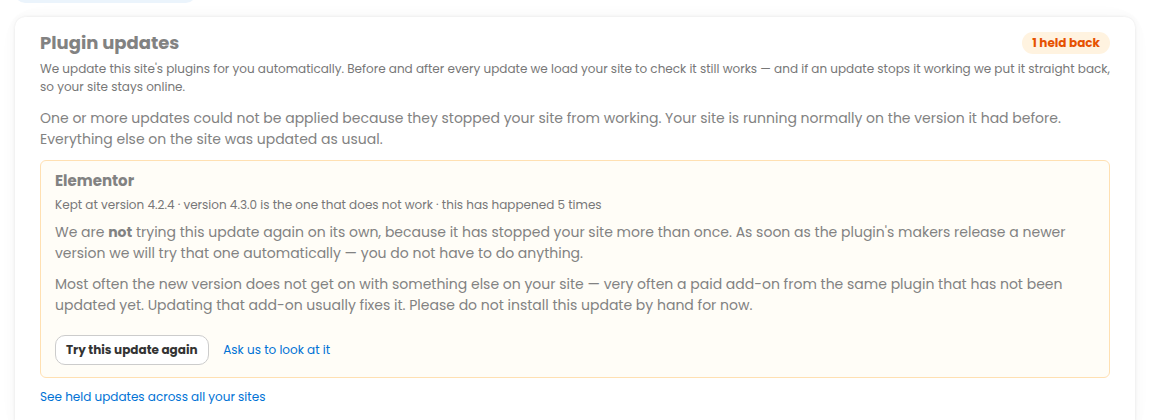
The plugin that broke your site stays on the version that works. We hold back that one plugin only, never the whole site – your site still needs its other security updates, and it gets them. That is the whole reason we hold one plugin rather than simply switching a site’s updates off.
You are told which one. We e-mail you when it happens, with the subject “We held back one plugin update on your domain – your site is fine”, so the first thing you read is that nothing is wrong with your site. That is the only e-mail you will get about it unless we later stop retrying (see below) – we do not write to you again every time the update is tried.
Where to see it in your dashboard
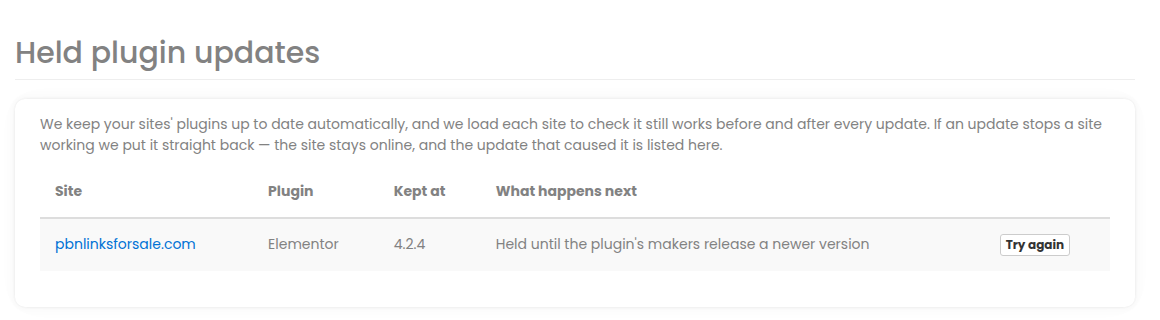
Two places show you exactly the same thing:
- The Plugin updates tab on the site itself, which says whether anything is being held, which plugin it is, which version we kept it on, and what happens next.
- The Held plugin updates page, which shows the same across every site on your account at once – the quickest way to see whether anything at all is being held.
Both carry a “Try this update again” button, so you can ask for it to be re-attempted whenever you want.
It tries again by itself
You do not have to chase a held update. As soon as a different version of that plugin is available – which is to say, as soon as its author ships a fix – we try it again automatically. If it works this time, the hold disappears and your site is fully up to date, with nobody having done anything.
If the same plugin breaks the same site a second time, we stop retrying on our own rather than putting your site through it over and over. We e-mail you once to say so – that is the second and last e-mail you would get about it – and from then on the “Try this update again” button is yours to press whenever you think the problem has been solved.
Is there anything you should do?
Normally, no. This is the whole point of it: your site stays current, and stays up, without you watching.
Two things are worth knowing anyway. First, if you notice a plugin on your site that is not on its newest version, check the Plugin updates tab before you update it by hand – it may be one we are holding precisely because the newer release stops your site loading. Second, if you have updated something yourself and the site has gone down, open a ticket and we will look at it with you.
And whatever happens, your site is backed up daily with one-click restore behind all of this, so there is always a way back.
What about site types other than WordPress?
The before-and-after check and the automatic roll-back described here are for WordPress sites, which is where plugin updates carry this risk. Our other content-management site types also keep themselves up to date automatically, and every site type is covered by hourly health checks that find and repair a broken site, taking a backup first.